Selection guide · 6 min
How to choose a monochromator
Start with the wavelength and bandpass your experiment needs. Then choose the instrument, ports and accessories as one working system.
Go to the accessory checklist ↓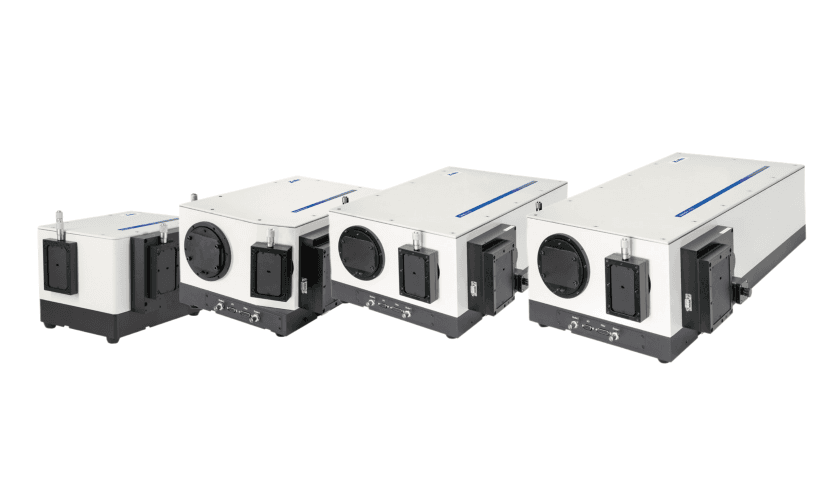
01Write the measurement down
Specify the wavelength range, the closest features you must separate, the light available and the time allowed per point. A broad fluorescence band and a narrow atomic doublet can need very different instruments.
Keep bandpass, wavelength accuracy and scan step separate. A 0.005 nm step does not mean the instrument resolves 0.005 nm.
Still deciding between a monochromator and a filter? Start with our wavelength-selector comparison.
02Choose what leaves the instrument
Scanning measurement
Entrance slit → grating → exit slit → point detector. Record intensity while scanning wavelength.
Array spectroscopy
A CCD or other array records a wavelength window. Select a detector port and its matching flange.
Tunable illumination
Broadband source → monochromator → sample. Plan output coupling and, where needed, a reference detector.
Dual-exit configurations can support more than one task. Choose the layout in our configuration builder before selecting adapters.
03Shortlist the instrument
Start with the shortest focal length that meets the resolution requirement. A longer instrument spreads wavelengths further, but its slower aperture can make collecting enough signal harder.
| Our range | Focal length / aperture | Reference resolution | Turret / grating size | Consider for |
|---|---|---|---|---|
| Omni-λ200i | 200 mm · f/3.5 | 0.15 nm | 2 × 50 × 50 mm | Broad bands; compact, faster-aperture setup. |
| Omni-λ300i / 300S | 320 mm · f/4.2 | 0.08 nm | 3 × 68 × 68 mm | A starting point for research scans. Check the i/S body and ports. |
| Omni-λ500i | 500 mm · f/6.5 | 0.05 nm | 3 × 68 × 68 mm | Closer spectral features; allow for the slower aperture. |
| Omni-750S | 750 mm · f/9.7 | 0.03 nm | 3 × 68 × 68 mm | Fine line separation when the available signal permits. |
| HiperS-320i | 320 mm · f/4.4 | 0.06 nm | 3 × 68 × 68 mm | Consider for multi-track / array imaging across the focal plane. |
Reference values use 1200 g/mm gratings and narrow slits. Omni i-series PMT values: 435.8 nm, 10 µm width, 4 mm height; HiperS: manufacturer PMT reference; 750S: 10 µm slit table. These values are not performance guarantees across every wavelength or slit setting. i- and S-series bodies and camera sampling differ.
For weak features beside intense excitation, also consider double monochromators and appropriate blocking filters. More stages improve rejection in the appropriate configuration while adding optical losses.
04Match the grating to the measurement
Choose groove density for dispersion and coverage, then blaze wavelength for efficiency where the signal matters. Check the efficiency curve, coating and detector response over the entire range; a mechanical scan limit is not a useful sensitivity range.
Check the physical size first: Omni-λ200i uses 50 × 50 mm gratings in a two-slot turret. The listed 300i, 300S, 500i, 750S and HiperS models use 68 × 68 mm gratings and three slots. They are not interchangeable.
05Set a usable slit width
A useful first estimate is bandpass ≈ reciprocal dispersion × slit width, with width in millimetres. It assumes equal projected entrance and exit widths and a slit-dominated instrument.
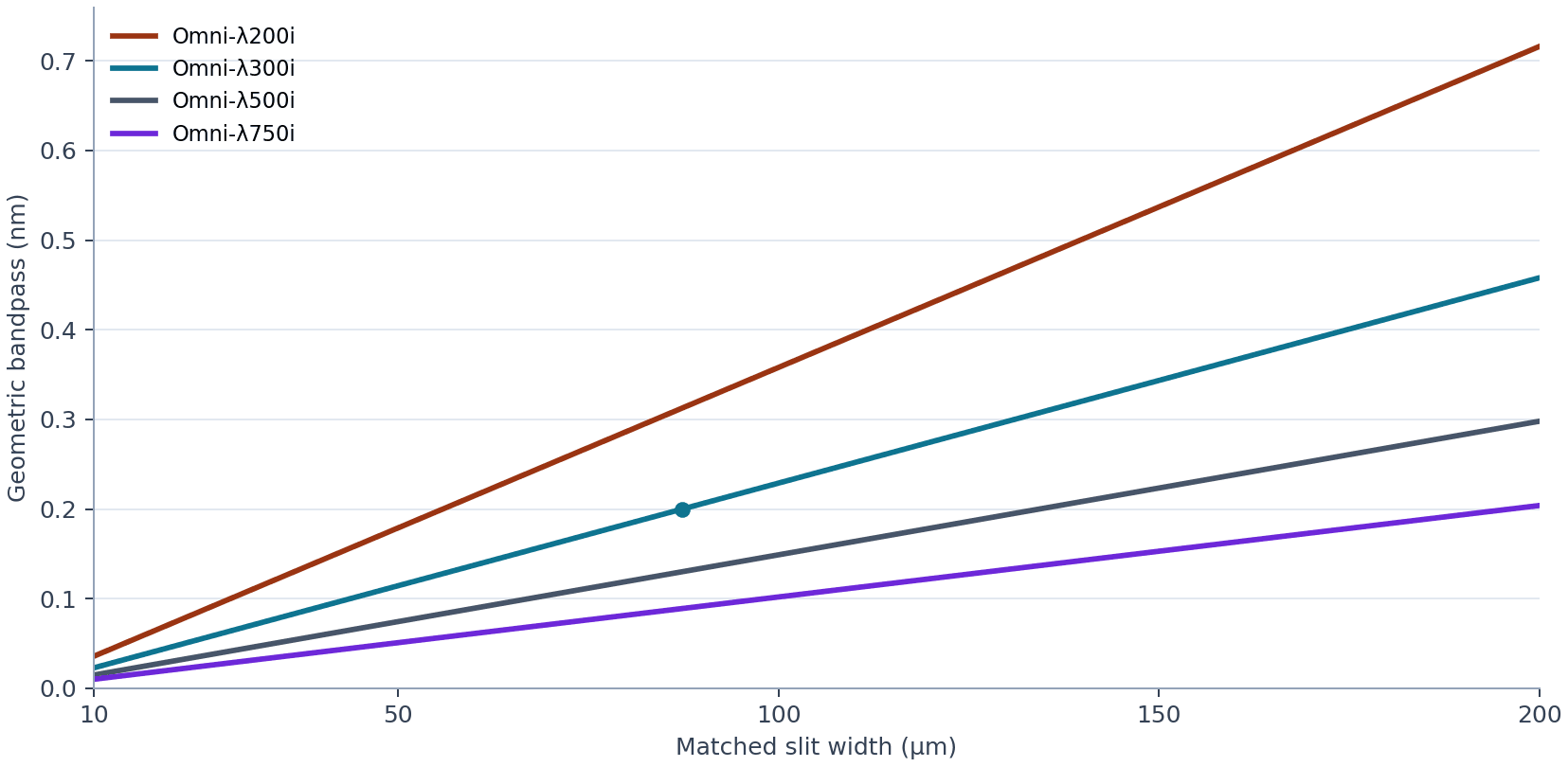
Example: for about 0.20 nm geometric bandpass on Omni-λ300i, 0.20 ÷ 2.29 ≈ 0.087 mm: start near 87 µm, then check a known narrow line. Closing the slit further loses signal and eventually stops improving resolution.
Use the existing bandpass and detector-sampling guide for the detailed tradeoff.
06Make the optical connections fit
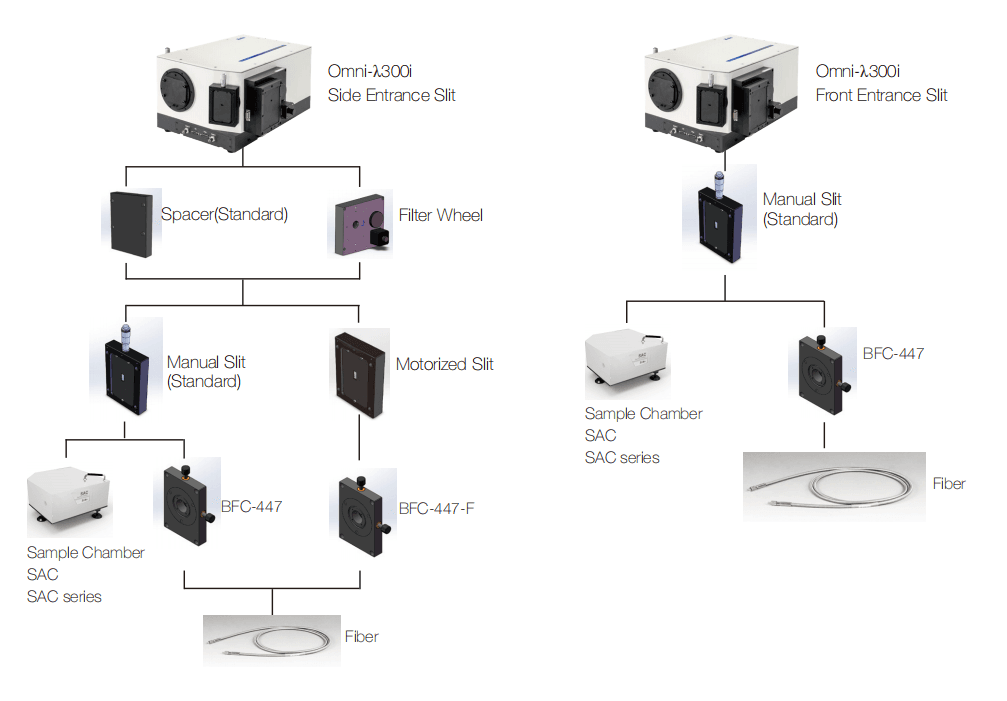
Image the source or fibre onto the entrance slit. Match the delivered cone to the instrument’s acceptance; check beam height, fibre connector and working distance. At the exit, choose a slit, detector mount or output relay for the selected task.
07Complete the accessory list
Confirm the base configuration before adding parts. A manual slit or a detector flange may already be included; a motorised slit, grating or filter set may need a separate selection.
| Component | When you need it | Our options |
|---|---|---|
| Grating + matching turret | Required. Confirm what is supplied; a turret alone does not specify a grating. | Select compatible gratings |
| Entrance slit; exit slit for scanning | Required optical apertures. Manual slits may already be in the base configuration; motorised slits are an option. | Configure the ports and slits |
| Input and output coupling | Match free-space relay optics or the fibre core, connector, focal ratio and beam height. | FLG fibres and coupling options |
| Detector + readout, or output optics | For measurements: select a point detector with suitable electronics, or an array camera. For illumination: relay the selected output to the sample. | Spectroscopy detectors |
| CCD flange | Only for an array detector. Match the instrument, camera mount and focal-plane position. OMF-ANDOR-A13i is a flange, not a monochromator. | OMF-ANDOR-A13i |
| Order-sorting filters | Needed when overlapping diffraction orders can reach the detector. Add a wheel if filters must change during a scan. | SD25 filter wheels |
| Light source or sample chamber | Application-dependent: a broadband source for tunable illumination; a SAC chamber for the relevant sample geometry. | SAC sample chambers |
| Shutter; chopper + lock-in | Choose a shutter for exposure control. A chopper and lock-in help selected modulated, weak-signal measurements; they are not universal requirements. | DCS540 optical chopper |
| Calibration, software and mounting | Plan a wavelength reference, suitable mounts, detector cables, acquisition software and power supplies. Confirm which items are included. | Accessories catalogue |
Two easy checks: the published SD25-R wheel fits Omni-λ200i; standard SD25 fits 300i / 500i / 750i. At a 600 nm first-order setting, 300 nm second-order light can overlap: choose an appropriate order-sorting filter. A Raman edge filter serves a different blocking requirement.
For tunable illumination, compare our broadband light sources. For automated work, confirm computer / SDK compatibility, slit control and triggering before ordering.
08Verify the assembled system
Before measuring a sample, check wavelength calibration and the line width at the actual grating and slit setting. Record dark / background signals, check unwanted orders and confirm the detector stays within its usable range. For array spectra, also verify focus and spectral sampling.
Select the complete system with Precisometer
Send your wavelength range, required bandpass, signal level, input connection and existing detector. We’ll help select the instrument and compatible accessories, and confirm what is included.