Back to Home

Microscopy Camera/Microscope Camera

UA410CA

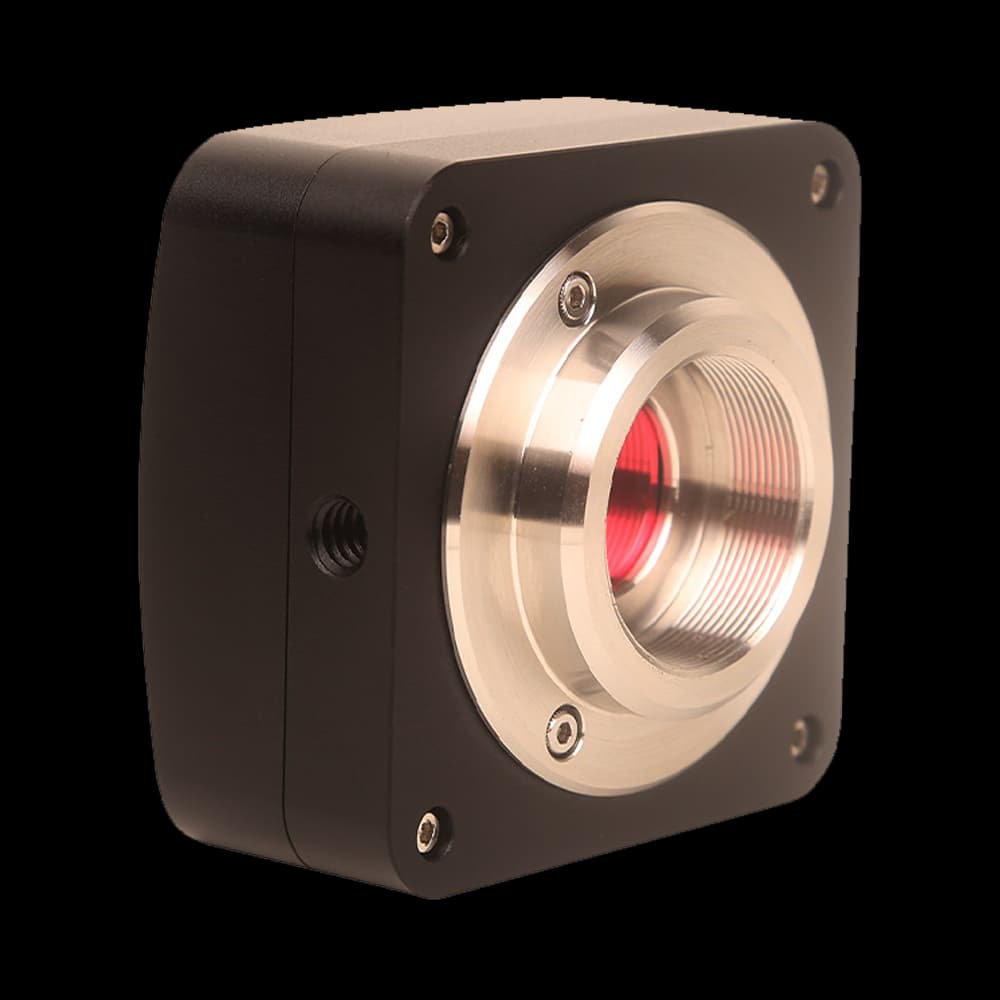
UA410CA Microscopy Camera/Microscope Camera with IMX347(C) sensor, 4.1M (2688×1536) for professional imaging.

Sensor
IMX347(C)
Resolution
4.1M (2688×1536)
Pixel Size
2.9 µm × 2.9 µm
Frame Rate
8.5 fps @ 2688×1536; 11.5 fps @ 2048×1536; 15 fps @ 1536×1536; 34 fps @ 1344×768
Interface
USB2.0
UA410CA

Application context

Why this design is used

Scientific imaging

UA410CA: The IMX347(C) sensor, 4.1M (2688×1536) resolution, and 2.9 µm × 2.9 µm pixels defines the sensitivity, sampling and field coverage available for Scientific imaging. The 8.5 fps @ 2688×1536; 11.5 fps @ 2048×1536; 15 fps @ 1536×1536; 34 fps @ 1344×768 frame-rate listing also sets the fastest full-frame acquisition regime.

Instrument integration

UA410CA: The IMX347(C) sensor, 4.1M (2688×1536) resolution, and 2.9 µm × 2.9 µm pixels defines the sensitivity, sampling and field coverage available for Instrument integration. The 8.5 fps @ 2688×1536; 11.5 fps @ 2048×1536; 15 fps @ 1536×1536; 34 fps @ 1344×768 frame-rate listing also sets the fastest full-frame acquisition regime.

Specifications

UA410CA

22 specification rows

The UA410CA is a microscopy camera in the UA series, built around a IMX347(C) sensor, 4.1M (2688×1536) resolution, 2.9 µm × 2.9 µm pixels, frame rates up to 8.5 fps @ 2688×1536; 11.5 fps @ 2048×1536; 15 fps @ 1536×1536; 34 fps @ 1344×768, a USB2.0 interface. It suits microscopy camera/microscope camera where reliable imaging performance and interface compatibility matter.

Key Parameters

ModelUA410CA
SensorIMX347(C)
Effective Pixels / Resolution4.1M (2688×1536)
Frame Rate (Full Resolution)8.5 fps @ 2688×1536; 11.5 fps @ 2048×1536; 15 fps @ 1536×1536; 34 fps @ 1344×768
Shutter TypeRolling Shutter
Color TypeColor

Imaging Performance

Pixel Size2.9 µm × 2.9 µm
Sensor Size7.795 mm × 4.408 mm
Diagonal1/1.8" (8.96 mm)
Dynamic RangeAvailable on request
Bit Depth8-bit
Sensitivity2376 mV with 1/30s; 0.15 mV with 1/30s

Interface & Mechanical

Data InterfaceUSB2.0
GPIOAvailable on request
Lens MountC-mount
DimensionsAvailable on request
Weight0.5~0.55Kg
Power SupplyUSB powered

Environment & Certification

Operating Temperature / Humidity10 °C ~ 50 °C / 30%~80%RH
Storage Temperature / Humidity20 °C ~ 60 °C / 10%~60%RH
Operating SystemWindows/Linux/macOS/Android multi-platform SDK (native C/C++, C#/VB.NET, Python, Java, DirectShow, Twain, etc.)
CertificationCE, FCC

System integration

Integration and compatibility

Use these checks to connect UA410CA to the surrounding optical, mechanical and control system. Every value shown is taken from this model's own specification record.

Lens and microscope interface
Lens Mount: C-mount
Use a lens image circle that covers the sensor and check flange distance before adding C/CS, F-mount or M42 adapters.
Sensor and sampling
Sensor: IMX347(C) · Resolution: 4.1M (2688×1536)
Match pixel pitch to the diffraction-limited spot the optics deliver. Sampling finer than the optics resolve multiplies data volume without adding information; sampling coarser discards resolution you have paid for.
Interface and data rate
Frame Rate: 8.5 fps @ 2688×1536; 11.5 fps @ 2048×1536; 15 fps @ 1536×1536; 34 fps @ 1344×768 · Interface: USB2.0
Confirm the host can sustain the interface bandwidth continuously, not in burst. A camera that outruns the write path stalls acquisition rather than dropping quietly to a lower rate.
Hardware synchronization
GPIO: Available on request
Confirm edge polarity, pulse-width limits and whether each line is opto-isolated before connecting TTL or GPIO signals. A software exposure command is not equivalent to a hardware trigger.
Cooling and noise floor
Dynamic Range: Available on request
Judge these figures at the exposure time you will actually use. Cooling matters where dark current accumulates over seconds; read noise dominates short exposures where it never does.

Technical FAQ

Integration questions for UA410CA

What lens mount is required for the UA410CA?

Lens Mount: C-mount. Use a lens image circle that covers the sensor and check flange distance before adding C/CS, F-mount or M42 adapters.

What sensor and pixel pitch does the UA410CA use?

Sensor: IMX347(C) · Resolution: 4.1M (2688×1536). Match pixel pitch to the diffraction-limited spot the optics deliver. Sampling finer than the optics resolve multiplies data volume without adding information; sampling coarser discards resolution you have paid for.

How does the UA410CA connect to the acquisition computer?

Frame Rate: 8.5 fps @ 2688×1536; 11.5 fps @ 2048×1536; 15 fps @ 1536×1536; 34 fps @ 1344×768 · Interface: USB2.0. Confirm the host can sustain the interface bandwidth continuously, not in burst. A camera that outruns the write path stalls acquisition rather than dropping quietly to a lower rate.

Does the UA410CA support hardware triggering?

GPIO: Available on request. Confirm edge polarity, pulse-width limits and whether each line is opto-isolated before connecting TTL or GPIO signals. A software exposure command is not equivalent to a hardware trigger.

What is the noise performance of the UA410CA?

Dynamic Range: Available on request. Judge these figures at the exposure time you will actually use. Cooling matters where dark current accumulates over seconds; read noise dominates short exposures where it never does.

Need help choosing?

Tell us your sensor, resolution, spectral range, frame-rate, interface, and software requirements and we will confirm the matching configuration and lead time.

Open camera finder

Model selection

Nearby series comparison

Compare UA410CA with the closest available models in the UA family. Confirm option-dependent values on the final configuration before ordering.

Selection parameterUA410CA (current)UA310CBUA410CB
SensorIMX347(C)IMX123(C)IMX664(C)
Resolution4.1M (2688×1536)3.1M (2048×1536)4.1M (2688×1520)
Sensor size7.795 mm × 4.408 mm5.12 mm × 3.84 mm7.795 mm × 4.408 mm
Pixel size / frame rate2.9 µm × 2.9 µm2.5 µm × 2.5 µm2.9 µm × 2.9 µm

Other cameras on the IMX347 sensor

The IMX347 appears in 4 models across the catalogue, differing in cooling, shutter, interface and colour filter. Compare them side by side before settling on a variant.